Rendering code blocks: a quick tour
· 1 min read
This article is a visual test for Markdown rendering: syntax highlighting via Shiki, light/dark themes, a “copy” button, and horizontal scroll handling when a line is too long. Inline code like const x = 42 should also stay readable, clearly distinct from regular text.
JavaScript
A small, classic debounce utility:
function debounce(fn, delay = 300) {
  let timeoutId;
  return function debounced(...args) {
    clearTimeout(timeoutId);
    timeoutId = setTimeout(() => fn.apply(this, args), delay);
  };
}

const onResize = debounce(() => {
  console.log("resized to", window.innerWidth, window.innerHeight);
}, 150);

window.addEventListener("resize", onResize);
Python
An example with types and a deliberately long line to test horizontal scrolling:
from dataclasses import dataclass


@dataclass
class Article:
    title: str
    date: str
    tags: list[str]

    def summary(self) -> str:
        return f"{self.title} ({self.date}) — tags: {', '.join(self.tags) if self.tags else 'none'}"


articles = [Article("Welcome", "2026-07-20", ["meta"]), Article("Code blocks", "2026-07-25", ["meta", "dev"])]
for article in sorted(articles, key=lambda a: a.date, reverse=True):
    print(article.summary())
Bash
#!/usr/bin/env bash
set -euo pipefail

for dir in src/content/articles/*/; do
  slug="$(basename "$dir")"
  echo "→ publishing article: ${slug}"
done

npm run build && npm run preview -- --port 4321
CSS
.code-block {
  border: 1px solid var(--color-border);
  background-color: var(--color-code-bg);
}
If everything is wired up correctly, each block above should show a [ copy ] button in the top right, keep its colors readable in both light and dark mode, and never break the page width even on the longest Python line.
Diagram
This article lives in its own folder (src/content/articles/code-blocks/), with this diagram sitting right next to index.md, referenced with a relative path:
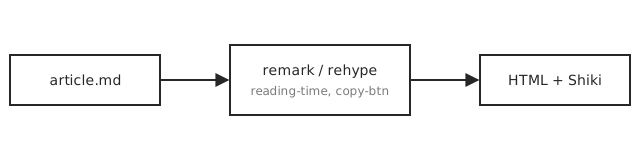
Astro automatically optimizes and bundles any local image referenced this way — no extra configuration needed.